Legal Templates
Fillable Affidavit of Identity PDF
Fill out an affidavit of identity online — a sworn statement of who someone is — then sign and download a finished PDF. It is not a DMV form and not a state ID.
Start for $1. After 7 days, your subscription renews at $39.99/month unless cancelled. Cancel anytime.
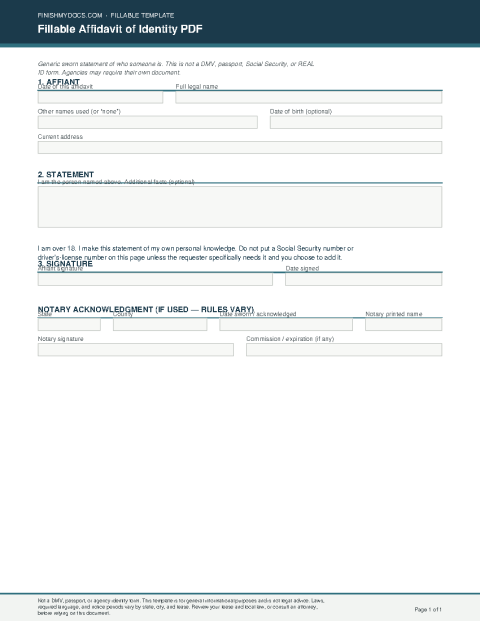
This is a national template for general use and is not legal advice. An affidavit of identity is a sworn statement of who someone is. It is not a DMV form and not a state ID.
What an affidavit of identity is
An affidavit of identity is a sworn statement of who someone is. It records the affiant’s name, any other name they use, address, and a statement in their own words.
When people use this form
Use it when you need a fillable sworn statement of identity and no specialized form applies. Write the facts clearly.
This is not a DMV form and not a state ID. It is not legal advice. It is not a substitute for a motor-vehicle agency form or a state identification card if those require their own. Notary and oath rules vary.
Fill it out online
Open the template in the FinishMyDocs editor, enter the affiant’s name, any other name, address, and the statement. Sign on screen. Complete the notary block only if a notary is actually taking an oath or acknowledgment. Download, print, or email the finished PDF.
How to fill out this document online
-
1
Open the affidavit
Click “Edit Document Online” to load the fillable affidavit of identity in your browser.
-
2
Identify the affiant
Enter the date, the affiant’s name, any other name they use, address, and date of birth if you use that line.
-
3
Write the identity statement
State the facts in your own words. This is not a DMV form and not a state ID.
-
4
Sign and download
Sign the affidavit. Complete the notary block only if a notary is taking an oath or acknowledgment. Then download, print, or email the PDF.
Edit, sign, download, print, or email
Open Fillable Affidavit of Identity PDF in the FinishMyDocs editor to type into every field, add today's date, place checkmarks, highlight key sections, and sign by drawing, typing, or uploading your signature. Need someone else's signature? Send them a secure signing link and get notified the moment they're done.
When you're finished, download the completed PDF, export pages as PNG or JPEG images, print a flattened copy, or email it straight to any recipient — your work is saved to your private account the whole time.