Government Forms
Fill Out Form I-485 Online
USCIS Form I-485 is the application used to apply for lawful permanent residence (a green card) from within the United States. Fill out all 20 pages online, then download and print your completed form.
Start for $1. After 7 days, your subscription renews at $39.99/month unless cancelled. Cancel anytime.
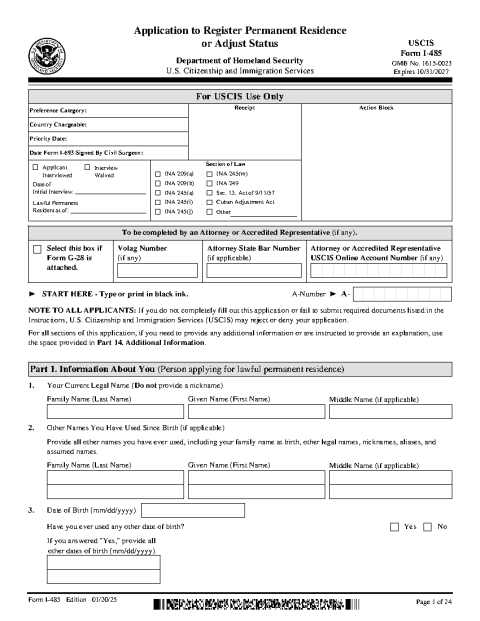
This is the official USCIS Form I-485 reproduced for convenience. FinishMyDocs.com is a private document service, not affiliated with USCIS, DHS, or any government agency, and does not provide legal advice. The form is available free at uscis.gov, where eligible applicants may also file online. Completing the form here does not submit it to USCIS — follow the official instructions to file. Consider consulting a licensed immigration attorney. Official source: https://www.uscis.gov/i-485
What is Form I-485?
Form I-485, Application to Register Permanent Residence or Adjust Status, is the USCIS form used to apply for a green card without leaving the United States — a process known as adjustment of status. It is one of the most detailed immigration forms: the current edition runs 20 pages and asks about your immigration history, family, employment, and admissibility.
Who files Form I-485?
Applicants already in the U.S. who have an available immigrant visa category — for example the spouse, parent, or child of a U.S. citizen, employment-based applicants with an approved petition, asylees and refugees after one year, and certain other categories. Each applicant, including family members, files their own I-485.
Filling out the I-485 online
Typing the form is far easier than hand-writing 20 pages — and USCIS asks that answers be legible. Open the official form in the FinishMyDocs editor to type into every section, add dates, check the correct boxes, and sign. Your progress saves automatically, so you can work on it across multiple sittings — helpful for a form this long.
Important: completing the form here does not submit it to USCIS. When you are done, download and print your completed I-485, sign it in ink where required, attach the required evidence and filing fee, and mail it to the USCIS address listed for your category in the official instructions.
How to fill out this document online
-
1
Open the official I-485
Click "Edit Document Online" to load the current 20-page USCIS edition of Form I-485 in the editor.
-
2
Type your answers
Work through Parts 1–14: personal information, immigration history, family, employment, and the admissibility questions. Add checkmarks for every Yes/No item.
-
3
Review and sign
Double-check names, A-Number, and dates against your documents, then add your signature and the date in Part 10.
-
4
Download, print, and file
Download the completed PDF, print it single-sided, sign in ink, and mail it with your supporting evidence and fee to the USCIS lockbox for your category.
Edit, sign, download, print, or email
Open Form I-485 (Application to Register Permanent Residence) in the FinishMyDocs editor to type into every field, add today's date, place checkmarks, highlight key sections, and sign by drawing, typing, or uploading your signature. Need someone else's signature? Send them a secure signing link and get notified the moment they're done.
When you're finished, download the completed PDF, export pages as PNG or JPEG images, print a flattened copy, or email it straight to any recipient — your work is saved to your private account the whole time.
Frequently asked questions
Related forms & templates
Form I-9 (Employment Eligibility Verification)
Form I-9 verifies the identity and employment authorization of every person hired in the United Stat
Medical Release Form (HIPAA Authorization)
Fill out a HIPAA-compliant medical records release online — authorize a provider to share your healt
Passport Renewal (DS-82) Preparation Guide
A preparation guide for renewing a U.S. passport with Form DS-82 — organize your details, photo, and
Child Travel Consent Form
Complete a child travel consent letter online — authorize your minor child to travel with one parent