
Legal Templates
Fill Out a Bill of Sale Online
Fill out a bill of sale online for a car, boat, trailer, or other personal property — document the buyer, seller, price, and condition, then sign and download.
Start for $1. After 7 days, your subscription renews at $39.99/month unless cancelled. Cancel anytime.
This template is provided for general informational purposes and is not legal advice. Bill of sale requirements vary by state and by the type of property sold — have a qualified attorney or your state DMV confirm the requirements before relying on the final document.
Why a bill of sale matters
A bill of sale is the written record that ownership of an item — most often a vehicle, boat, trailer, firearm, or piece of equipment — passed from seller to buyer on a specific date for a specific price. For the seller, it's proof you no longer own the item if parking tickets or liability questions surface later. For the buyer, it's evidence of purchase for registration, insurance, and taxes. A handshake transfers the keys; a bill of sale protects both people.
What to include
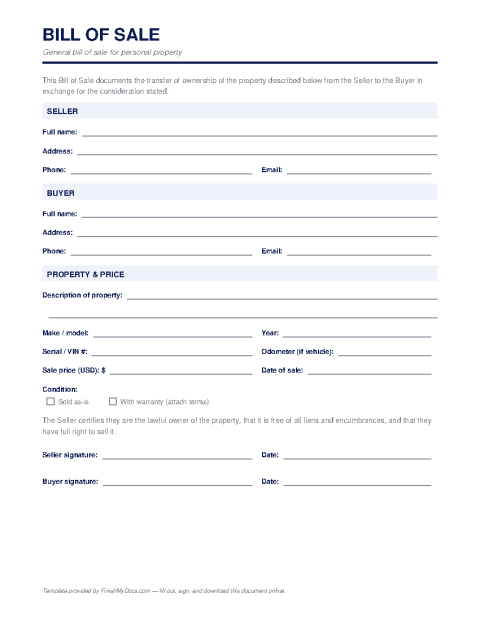
A solid bill of sale identifies both parties with names and addresses, describes the item precisely (for a vehicle: year, make, model, VIN, and odometer reading), states the sale price and payment method, notes whether the item is sold "as-is" or with any warranty, and carries both signatures with the date. Some states require a notarized bill of sale for vehicle transfers, and many DMVs have their own preferred form — check your state's rules before the sale.
Completing it online
With FinishMyDocs you can type every detail into the template from your phone or laptop, have both parties e-sign or print for wet signatures, and download a PDF for each side. No deciphering handwriting on the trunk of a car. Each party should keep a copy indefinitely — it's the kind of document you only need years later, when you really need it.
How to fill out this document online
-
1
Identify buyer and seller
Enter the full legal names and addresses of both parties at the top of the template.
-
2
Describe the item
Add a precise description — for vehicles, include the year, make, model, VIN, and current odometer reading.
-
3
Record price and condition
State the sale price, payment method, sale date, and whether the item is sold as-is or with a warranty.
-
4
Sign and exchange copies
Both parties sign — electronically or in ink after printing — and each keeps a downloaded PDF copy for their records.
Edit, sign, download, print, or email
Open Bill of Sale in the FinishMyDocs editor to type into every field, add today's date, place checkmarks, highlight key sections, and sign by drawing, typing, or uploading your signature. Need someone else's signature? Send them a secure signing link and get notified the moment they're done.
When you're finished, download the completed PDF, export pages as PNG or JPEG images, print a flattened copy, or email it straight to any recipient — your work is saved to your private account the whole time.
Frequently asked questions
Related forms & templates
Lease Agreement Template
Customize a residential lease agreement online — rent, deposit, term, and house rules — then have la
Power of Attorney Template
Prepare a power of attorney online — name your agent, define their powers, and download a PDF ready
Receipt Template
Create a payment receipt online — record the payer, amount, date, and what was paid for, then downlo