Employment Forms
Fill Out Form I-9 Online
Form I-9 verifies the identity and employment authorization of every person hired in the United States. Fill out Section 1 as an employee or Section 2 as an employer, then download or print.
Start for $1. After 7 days, your subscription renews at $39.99/month unless cancelled. Cancel anytime.
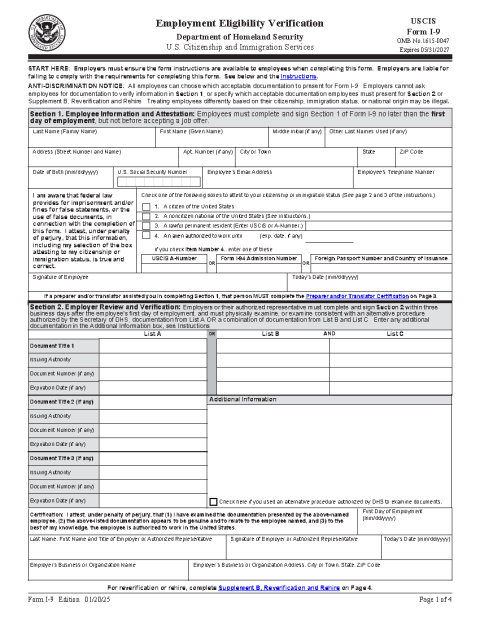
This is the official USCIS Form I-9 reproduced for convenience. FinishMyDocs.com is a private document service, not affiliated with USCIS or any government agency. The form is available free at uscis.gov. Employers are responsible for following the official I-9 instructions, document-examination rules, and retention requirements. Official source: https://www.uscis.gov/i-9
What is Form I-9?
Form I-9, Employment Eligibility Verification, is the USCIS form every U.S. employer must complete for each person they hire. It confirms the employee's identity and authorization to work in the United States. Unlike tax forms, the I-9 is not sent to any agency — the employer keeps it on file and must produce it if inspected.
Who completes which section?
The employee completes and signs Section 1 no later than their first day of work, attesting to their citizenship or immigration status. The employer (or authorized representative) completes Section 2 within three business days of the start date, recording the documents presented — a passport, or a combination such as a driver's license plus Social Security card. A supplement covers reverification and rehires.
Completing the I-9 online
Type directly into the official form in the FinishMyDocs editor: employee details and attestation checkboxes in Section 1, document titles, numbers, and expiration dates in Section 2, plus signatures and dates for both parties. You can even send the form to the other party for their signature using a secure signing link — useful for remote hires. When finished, download or print the completed form for your records.
Employers should retain each I-9 for three years after the date of hire or one year after employment ends, whichever is later.
How to fill out this document online
-
1
Open the official I-9
Click "Edit Document Online" to load the current USCIS edition of Form I-9 in the editor.
-
2
Employee completes Section 1
Enter name, address, date of birth, and check the correct citizenship/authorization status, then sign and date — no later than the first day of work.
-
3
Employer completes Section 2
Record the identity and work-authorization documents presented, with numbers and expiration dates, within three business days of the start date. Invite the other party to sign remotely if needed.
-
4
Download and retain
Download or print the completed form and keep it on file — three years after hire or one year after employment ends, whichever is later.
Edit, sign, download, print, or email
Open Form I-9 (Employment Eligibility Verification) in the FinishMyDocs editor to type into every field, add today's date, place checkmarks, highlight key sections, and sign by drawing, typing, or uploading your signature. Need someone else's signature? Send them a secure signing link and get notified the moment they're done.
When you're finished, download the completed PDF, export pages as PNG or JPEG images, print a flattened copy, or email it straight to any recipient — your work is saved to your private account the whole time.
Frequently asked questions
Related forms & templates
Employment Application Form
Fill out a standard employment application online — personal details, work history, education, and r
Form I-485 (Application to Register Permanent Residence)
USCIS Form I-485 is the application used to apply for lawful permanent residence (a green card) from
W-4 Form (Employee's Withholding Certificate)
Complete the IRS W-4 Employee's Withholding Certificate online to tell your employer how much federa
W-9 Form
Fill out the IRS W-9 Request for Taxpayer Identification Number and Certification online, then sign