Business Forms
Create a Payment Receipt Online
Create a payment receipt online — record the payer, amount, date, and what was paid for, then download or print a professional PDF receipt.
Start for $1. After 7 days, your subscription renews at $39.99/month unless cancelled. Cancel anytime.
Proof of payment, on demand
A receipt is the written acknowledgment that payment changed hands — the counterpart to an invoice. Where an invoice asks for money, a receipt confirms it arrived. Landlords issuing rent receipts, sellers in cash transactions, service providers confirming a deposit, and small businesses without a point-of-sale system all need a quick way to produce one. In several states, landlords are legally required to provide a rent receipt on request (and always for cash).
What makes a receipt complete
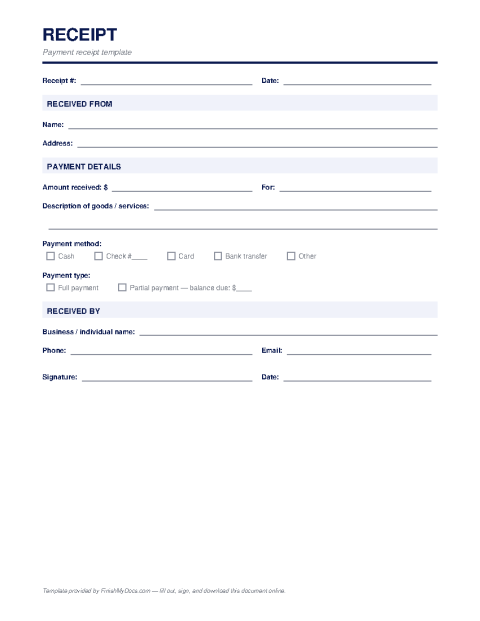
A useful receipt records the date of payment, who paid, who received the payment, the amount, the payment method (cash, check number, card, transfer), what the payment was for, and any balance remaining. A receipt number helps both sides reference it later, and the recipient's signature gives a cash receipt real evidentiary weight.
Filling one out online
Open the template in the FinishMyDocs editor, type in the transaction details, sign, and download a clean PDF — done in a couple of minutes, whether you're at a desk or on your phone closing a sale in person. Receipts you issue stay in your dashboard, building a tidy payment history that makes bookkeeping and any future "did I pay you?" conversation painless.
How to fill out this document online
-
1
Enter the transaction details
Fill in the date, receipt number, payer's name, and the amount received.
-
2
Describe what was paid for
Add a short description — rent for a specific month, a product, a deposit — and note the payment method used.
-
3
Note any remaining balance
If the payment was partial, record the balance still owed so both parties agree on what's outstanding.
-
4
Sign and deliver
E-sign as the recipient of payment, then download the PDF to email to the payer or print on the spot.
Edit, sign, download, print, or email
Open Receipt Template in the FinishMyDocs editor to type into every field, add today's date, place checkmarks, highlight key sections, and sign by drawing, typing, or uploading your signature. Need someone else's signature? Send them a secure signing link and get notified the moment they're done.
When you're finished, download the completed PDF, export pages as PNG or JPEG images, print a flattened copy, or email it straight to any recipient — your work is saved to your private account the whole time.
Frequently asked questions
Related forms & templates
Bill of Sale
Fill out a bill of sale online for a car, boat, trailer, or other personal property — document the b
Invoice Template
Create a professional invoice online in minutes — add your business details, line items, and payment
Purchase Order Template
Fill out a purchase order online — list the items, quantities, prices, and delivery terms you're ord