Real Estate Forms
Fillable Security Deposit Receipt PDF
Fill out a security deposit receipt online — record the amount, payment method, and optional holding details — then sign and download a finished PDF.
Start for $1. After 7 days, your subscription renews at $39.99/month unless cancelled. Cancel anytime.
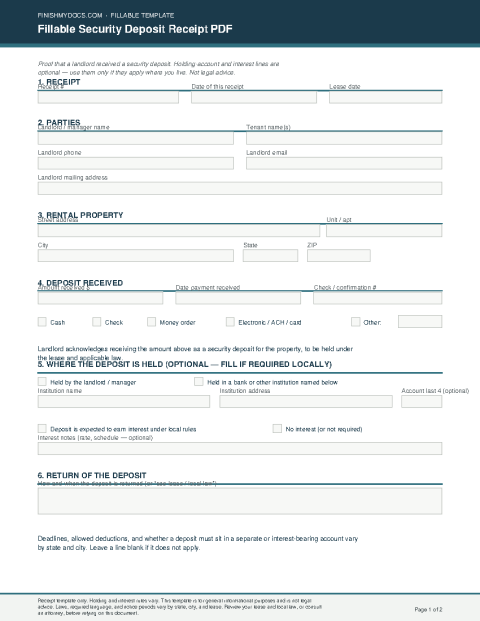
This is a national template for general use and is not legal advice. Holding-account and interest lines are optional — use them only if they apply where the property is located. Deposit rules vary by state and city.
What a security deposit receipt is
A security deposit receipt is a written record that a landlord received a security deposit for a rental. It lists who paid, the property, the amount, the date, and how the money was paid. Keep a copy with the lease.
When people use this form
Use it when a tenant pays a deposit at the start of a lease, or when you need a paper record of a deposit already received. Fill in the receipt number, parties, property address, amount, and payment method.
Holding-account and interest lines are optional. Use them only if they apply where the property is located. Leave those lines blank if they do not. This template does not invent state statutory language.
Fill it out online
Open the template in the FinishMyDocs editor, enter landlord and tenant names, the property address, the deposit amount and payment date, and mark how it was paid. Add optional bank or interest notes only if needed. Sign on screen, then download, print, or email the finished PDF.
How to fill out this document online
-
1
Open the receipt
Click “Edit Document Online” to load the fillable security deposit receipt in your browser.
-
2
Enter parties and property
Fill in the receipt date, landlord and tenant names, contact details, and the full property address.
-
3
Record the deposit
Enter the amount, payment date, and method. Holding-account and interest lines are optional — leave them blank if they do not apply.
-
4
Sign and download
Add the landlord signature and optional tenant acknowledgment, then download, print, or email the finished PDF. A copy stays in your dashboard.
Edit, sign, download, print, or email
Open Fillable Security Deposit Receipt PDF in the FinishMyDocs editor to type into every field, add today's date, place checkmarks, highlight key sections, and sign by drawing, typing, or uploading your signature. Need someone else's signature? Send them a secure signing link and get notified the moment they're done.
When you're finished, download the completed PDF, export pages as PNG or JPEG images, print a flattened copy, or email it straight to any recipient — your work is saved to your private account the whole time.