
Business Forms
Fill Out a Business Expense Report Online
Fill out a business expense report online — log dates, categories, amounts, and totals, then sign and submit a clean PDF for reimbursement or records.
Start for $1. After 7 days, your subscription renews at $39.99/month unless cancelled. Cancel anytime.
Getting reimbursed without the runaround
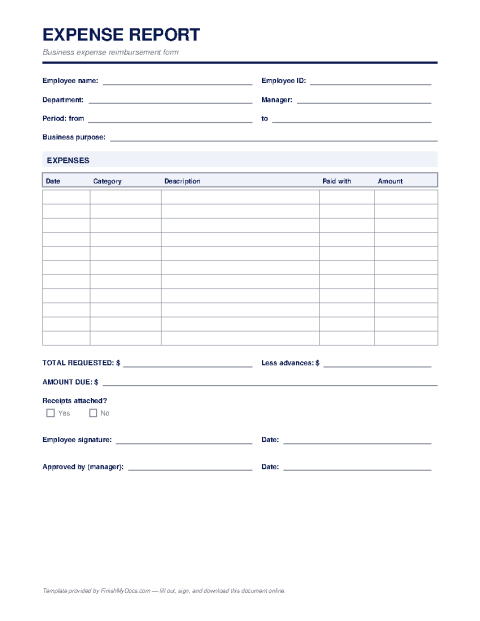
An expense report is how employees and contractors get paid back for money spent on the company's behalf — travel, meals, supplies, mileage, client entertainment. It's also how finance teams keep deductible business expenses documented for tax time. A complete, itemized report with receipts attached sails through approval; a vague one bounces between inboxes for weeks.
What goes on the report
Each line should carry the date, a category (lodging, airfare, meals, mileage, supplies), a short business-purpose description, and the amount. The header identifies who's reporting, the department or project, and the reporting period; the footer totals everything, subtracts any company-card charges or advances, and shows the net amount owed. The submitter signs, and a manager approves. The IRS expects business records to show amount, date, place, and business purpose — the same four things a good expense report captures naturally.
Filling it out online
Type each expense line into the FinishMyDocs editor — no spreadsheet formulas to break and no expense-software subscription needed for a small team. Total it up, e-sign, download the PDF, and email it to whoever approves reimbursements, with receipt photos attached. The copy saved in your dashboard doubles as your personal record of what you're owed.
How to fill out this document online
-
1
Complete the header
Enter your name, department or project, the reporting period, and the manager who will approve the report.
-
2
Itemize each expense
Add one line per expense with the date, category, business purpose, and amount — mirroring the receipts you'll attach.
-
3
Total and reconcile
Fill in the total, subtract company-card charges or cash advances, and show the net reimbursement due.
-
4
Sign and submit
E-sign the report, download the PDF, and email it to your approver with receipt images attached.
Edit, sign, download, print, or email
Open Business Expense Report in the FinishMyDocs editor to type into every field, add today's date, place checkmarks, highlight key sections, and sign by drawing, typing, or uploading your signature. Need someone else's signature? Send them a secure signing link and get notified the moment they're done.
When you're finished, download the completed PDF, export pages as PNG or JPEG images, print a flattened copy, or email it straight to any recipient — your work is saved to your private account the whole time.
Frequently asked questions
Related forms & templates
Invoice Template
Create a professional invoice online in minutes — add your business details, line items, and payment
Purchase Order Template
Fill out a purchase order online — list the items, quantities, prices, and delivery terms you're ord
Receipt Template
Create a payment receipt online — record the payer, amount, date, and what was paid for, then downlo