
Medical & Admin Forms
Fill Out a Medical Release Form Online
Fill out a HIPAA-compliant medical records release online — authorize a provider to share your health information with the people you choose.
Start for $1. After 7 days, your subscription renews at $39.99/month unless cancelled. Cancel anytime.
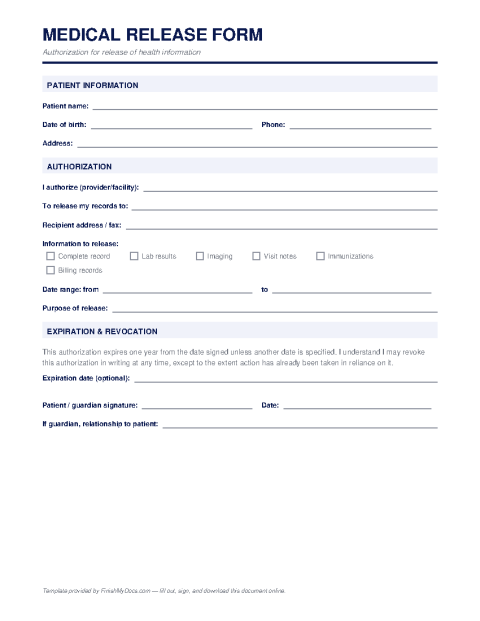
This template is provided for general informational purposes and is not legal advice. HIPAA and state privacy requirements vary by situation and record type — have a qualified attorney or your provider's records office confirm the form meets their requirements before relying on it.
Why providers ask for a signed release
Under the HIPAA Privacy Rule, doctors, hospitals, and other providers generally cannot share your health records with third parties — a new doctor, a family member, an attorney, an insurer — without your written authorization. A medical release form (HIPAA authorization) is that written permission. Without one on file, even your spouse may be told nothing more than that you are a patient.
What a valid authorization must specify
HIPAA requires the authorization to identify what information may be released (all records, or specific categories like lab results or imaging), who is releasing it, who may receive it, the purpose of the disclosure, an expiration date or event, and your dated signature. The form should also note your right to revoke the authorization in writing at any time. Releases involving psychotherapy notes, substance-use treatment, or HIV status often need explicit, separate language.
Completing it online
Typing the form in the FinishMyDocs editor avoids the two classic problems with releases: illegible handwriting and missing required elements, either of which gets the form bounced back by the records department. Fill in the patient, provider, recipient, scope, and expiration fields, e-sign, and download the PDF to deliver to your provider's medical records office.
Keep a copy, and remember a release is not permanent — you can revoke it in writing whenever you choose.
How to fill out this document online
-
1
Identify patient and provider
Enter the patient's full name and date of birth, plus the name and address of the provider or facility releasing the records.
-
2
Choose what may be shared
Specify the records covered — everything, a date range, or categories like labs and imaging — and note any sensitive categories needing explicit consent.
-
3
Name the recipient and purpose
Fill in who may receive the information, why, and when the authorization expires.
-
4
Sign and deliver
E-sign and date the form, download the PDF, and send it to the provider's medical records department. Keep a copy in your dashboard.
Edit, sign, download, print, or email
Open Medical Release Form (HIPAA Authorization) in the FinishMyDocs editor to type into every field, add today's date, place checkmarks, highlight key sections, and sign by drawing, typing, or uploading your signature. Need someone else's signature? Send them a secure signing link and get notified the moment they're done.
When you're finished, download the completed PDF, export pages as PNG or JPEG images, print a flattened copy, or email it straight to any recipient — your work is saved to your private account the whole time.
Frequently asked questions
Related forms & templates
Employment Application Form
Fill out a standard employment application online — personal details, work history, education, and r
Power of Attorney Template
Prepare a power of attorney online — name your agent, define their powers, and download a PDF ready
Child Travel Consent Form
Complete a child travel consent letter online — authorize your minor child to travel with one parent