
Legal Templates
Prepare a Power of Attorney Online
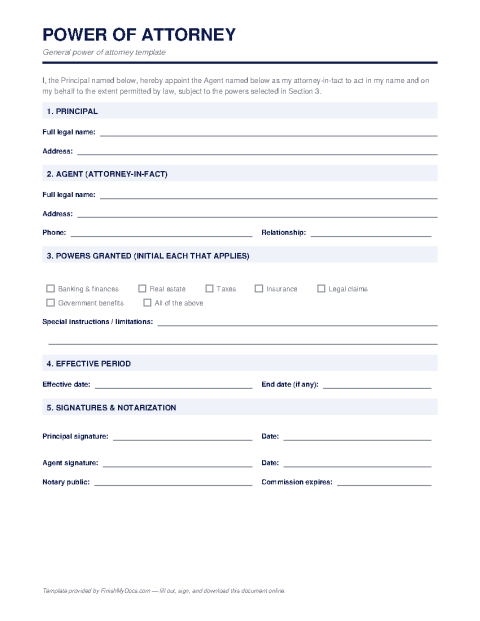
Prepare a power of attorney online — name your agent, define their powers, and download a PDF ready for the witnessing or notarization your state requires.
Start for $1. After 7 days, your subscription renews at $39.99/month unless cancelled. Cancel anytime.
This template is provided for general informational purposes and is not legal advice. Power of attorney requirements — including notarization, witnesses, and statutory language — vary by state, and the consequences of errors are serious. We strongly recommend having a qualified attorney review the final document before you sign it.
What a power of attorney does
A power of attorney (POA) is a legal document in which you (the "principal") authorize someone you trust (your "agent" or "attorney-in-fact") to act on your behalf. Depending on how it's written, that authority can be broad — managing finances, signing contracts, handling property — or narrow, like selling one specific car while you're overseas. It is one of the most consequential documents most people ever sign, which is exactly why it deserves care.
Types you should know
A general POA grants wide authority; a limited (special) POA covers only the transactions you list; a durable POA remains effective if you become incapacitated, while a non-durable one ends at that point; and a springing POA takes effect only upon a defined event, usually incapacity. Choosing the wrong type is the most common mistake — a non-durable POA, for instance, fails precisely when many families need it most.
Preparing it online — then making it official
Use the FinishMyDocs editor to fill in the principal, the agent and any successor agent, the specific powers granted, effective dates, and any limitations, then download the completed PDF. Be aware that filling out the form is only step one: nearly every state requires notarization, witnesses, or both before a POA is valid, and banks often apply their own acceptance rules. Print the finished document and complete the signing formalities your state requires.
Given the stakes, we strongly recommend having an attorney review your POA — especially a durable or general one — before you sign.
How to fill out this document online
-
1
Name the principal and agent
Enter your full legal name as principal, plus the name and contact details of your chosen agent and any successor agent.
-
2
Define the powers granted
Specify exactly what your agent may do — broad financial authority or a narrow, listed set of transactions — and any limitations.
-
3
Set effectiveness and durability
Choose when the POA takes effect, whether it survives your incapacity (durable), and any end date or terminating event.
-
4
Print and execute formally
Download the PDF, then sign before a notary and/or witnesses as your state requires — a POA usually isn't valid without these formalities.
Edit, sign, download, print, or email
Open Power of Attorney Template in the FinishMyDocs editor to type into every field, add today's date, place checkmarks, highlight key sections, and sign by drawing, typing, or uploading your signature. Need someone else's signature? Send them a secure signing link and get notified the moment they're done.
When you're finished, download the completed PDF, export pages as PNG or JPEG images, print a flattened copy, or email it straight to any recipient — your work is saved to your private account the whole time.
Frequently asked questions
Related forms & templates
Bill of Sale
Fill out a bill of sale online for a car, boat, trailer, or other personal property — document the b
Medical Release Form (HIPAA Authorization)
Fill out a HIPAA-compliant medical records release online — authorize a provider to share your healt
Non-Disclosure Agreement (NDA) Template
Fill out a non-disclosure agreement online — define the confidential information, term, and obligati